DO NOT DISTRIBUTE
This article is for Cadmium employees and contractors ONLY and should not be distributed.
In the Eventscribe Mobile App, we are improving how data is retrieved, stored, and displayed to enhance speed and performance. Optimizations will reduce load times, enable smarter data storage, and support a smoother user experience.
This document is intended to outline internal updates and important details on data optimization roadmap initiative.
IMPORTANT NOTE
This article applies only to mobile apps running version 26.03.10.
What's Changing?
The mobile app will now get data via APIs instead of Zip files. An API (Application Programming Interface) is a defined set of rules and endpoints that lets one software system request data or trigger actions in another system.
In practice, it’s how our mobile app and backend “talk” to each other in a consistent, secure way.
To understand the impact of this change, let's start with how things used to work.
Understanding App Zips
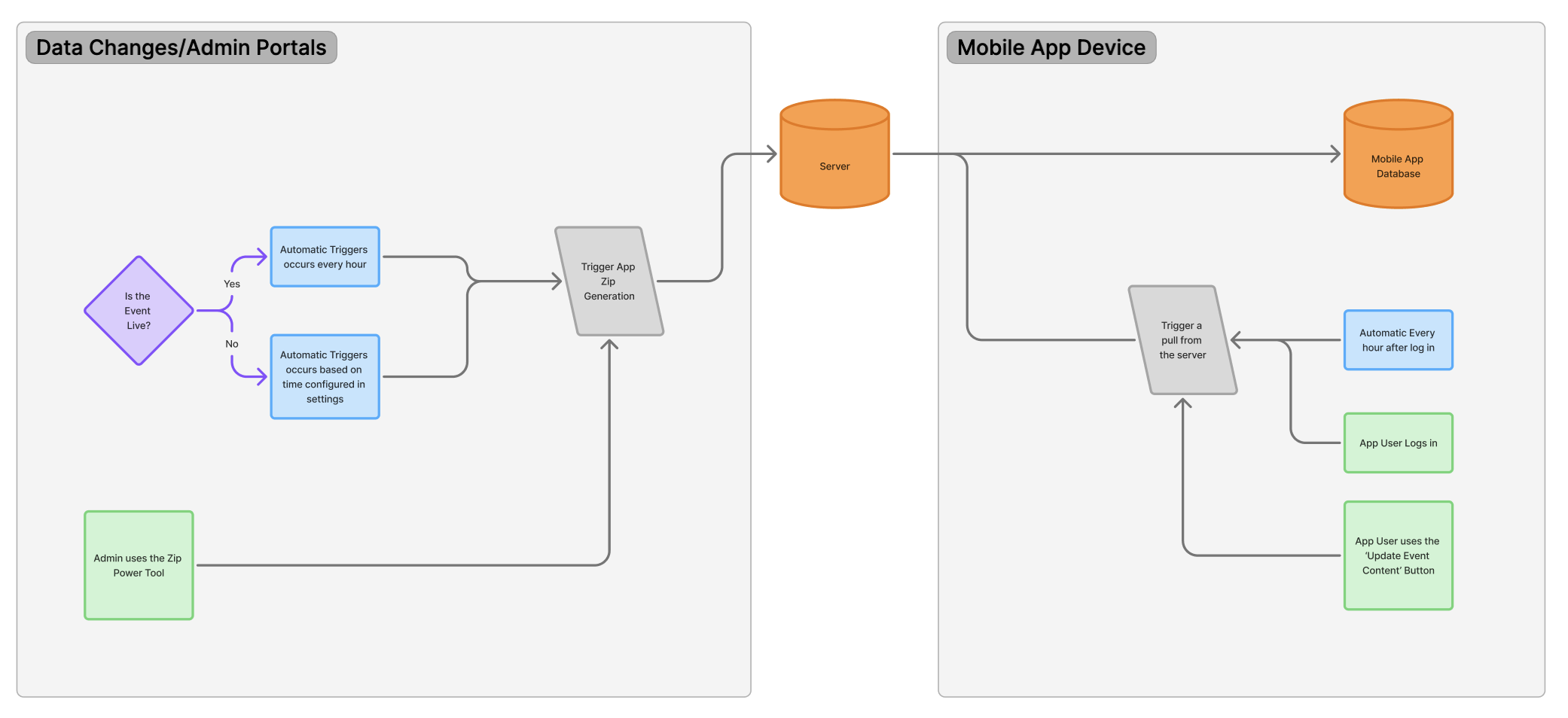
Data is consolidated into Zip files that the mobile app pulls from to download content to the app. There is a syncing process to consolidate this data automatically on the server and a separate process for the mobile app to pull from that zip file. During a live event, the zip files are generated on an hourly basis. Outside of a live event, the zip files are generated automatically based on the event settings. The mobile app device will automatically pull data from the zip files first upon login and then every hour after their initial login.
For mobile app users to get the most up to date data, admins need to force a sync of the zip files by using the zip file Power Tool and then mobile app users will need to use the 'Update Event Content' button in the hamburger menu on the home screen to grab the data from the zip files.
Understanding the Mobile App APIs
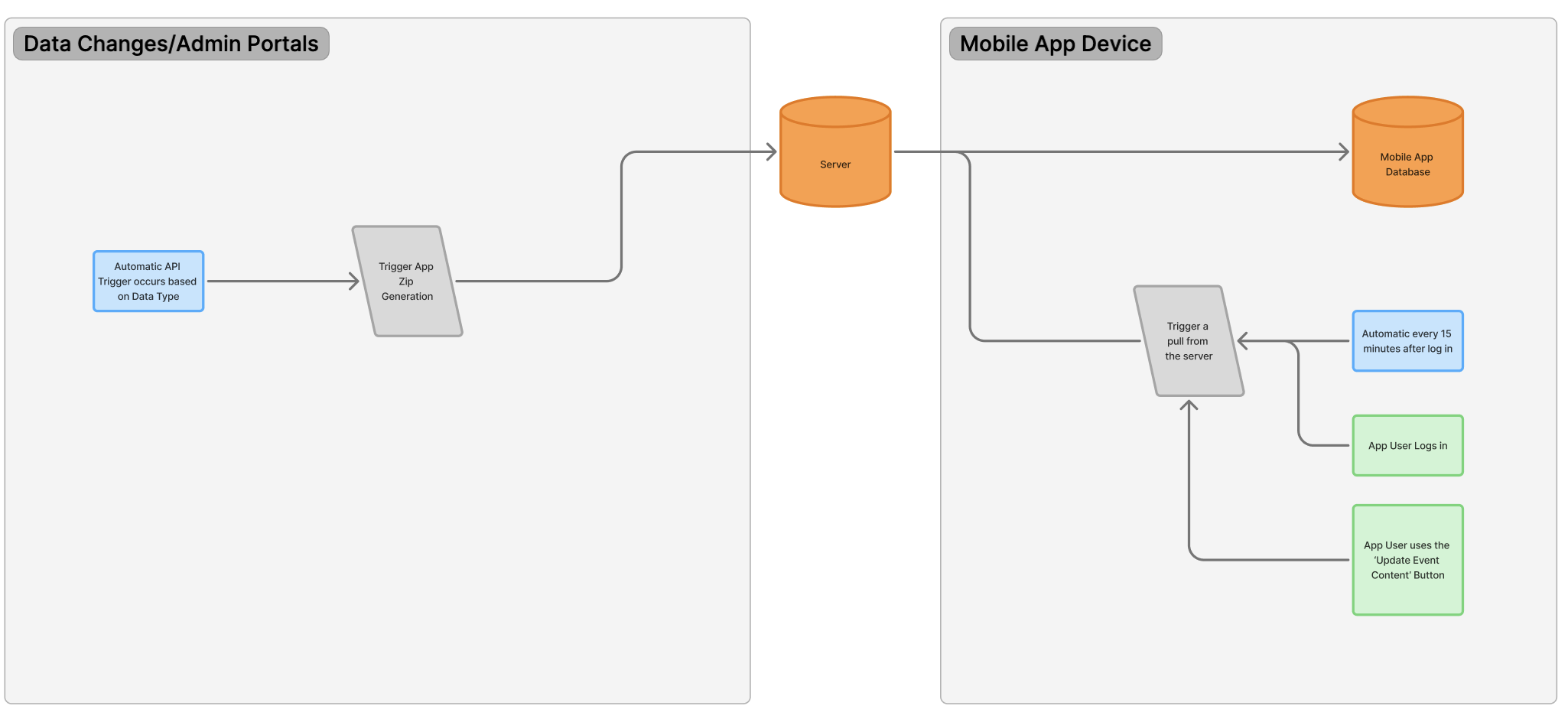
Data is consolidated to the server via APIs. Each data point will now push data to the server via a certain set of rules and will now trigger a push in varying frequencies. This allows us to have flexibility and adaptability to important data being updated more frequently based on how often the data type changes. For example, since app user data is updated more frequently the changes can be recognized more often than poster data that likely doesn't change as often. This also allows us to implement standard coding practices such as only pushing data that has changed (delta data) and implementing best caching practices. All this means is it allows us to have a lot more control over how to optimize the way the data is shared to the mobile app.
Along with the change, the mobile app has also been updated to retrieve data from the server every 15 minutes instead of the every hour. This time is based off of the time the user logs into the event app. Users can still use the 'Update Event Content' button in the hamburger menu on the home screen of the mobile app to retrieve the latest data on the server. We have also now implemented a pull to refresh on the home screen too that does the same thing as the 'Update Event Content' button.
IMPORTANT NOTE
The mobile app will update data automatically 72 hours before the event start date (App Settings > General > Event Information> Event Date Start) and 72 hours after the event end date (App Settings > General > Event Information > Event Date End).
Outside of this timeframe, changed data is not automatically updating the app and users will need to use the 'Update Event Content' button to get the latest data.
What Can App Users Expect?
Upon logging into the mobile app users will get an initial download of all the data from the server. This downloading of data is now done in batches that allows for data to load incrementally in the background. Once the user logs in the app will automatically update every 15 minutes from the initial time they logged in.
The user's device is pulling data from the server and the server gets updated in varying frequencies. The chart below details the current frequency for when the data is pushed to the cache on the server. If the cache has expired it will be rebuilt and the user will be pulling data directly from the database.
| Data Point | Automatic Caching Trigger Frequency (during live events) |
| Posters | 2 minutes |
| Poster Presenters | 2 minutes |
| App Users | 1 minutes |
| Presentations | 2 minutes |
| Sponsors | 1 minute |
| Schedule | 2 minutes |
| Speakers | 2 minutes |
NOTE
App Users can expect data changes to be updated on their device within the above frequency plus (+) 15 minutes. For example, if a Presentation date changes that date will be reflected in the mobile app within 17 minutes.
What Hasn't Changed Yet
As we continue with this initiative, the following data points still pull data via app Zips:
- Exhibitors
- Attendees (Static Attendee List)
- Event Info (see below for more details)
Event Info
The Event Information is handled in a different process than using zip files. The current process handles consolidating all the event information into one XML payload. It's a process that is run upon a user logging into the app to get everything that pp needs to configure itself for the event. This includes all the app settings, artwork URLs (sponsor splashes, device classes), ribbon JSON, tracks JSON, expo category JSON, lead retrieval JSON, expo hall schedule JSON.
We are working to transition the Event Info to use a mobile app APIs to be able to optimization all this data being shared with the app.
Event Info Automatic Updates Bug
The Event Information should automatically update the event app every hour, however, there is an active bug that is preventing the event info from being updated automatically.
Workaround: App users need to use the Update Event Content button or Pull-down refresh on the home page to get the latest data.
Please following along here for the latest information and updates: https://gocadmium.atlassian.net/servicedesk/customer/portal/33/PR-2320
FAQs
What is the plan for ending the support of the zip power tools?
After we have successfully moved all the data points to APIs, we will be removing the need for the mobile app .Zip files and will remove these Power Tools from the admin portal. Our plan is currently to remove the support of the .Zip files all at the same time.
What happens if I use a zip Power Tool on a data point that has already been transitioned to an API?
Nothing! The tool will still run but it is not connected to the app anymore.
What should I tell a customer if they try to run an app zip and it doesn't appear to do anything?
You can inform them that we are working on our data optimization roadmap initiative for our Eventscribe mobile app. We are taking a gradual approach to rolling out these updates and some of these tools may not work while we gradually release these updates.
If you can confirm the data is not displaying as expected, you can add a Product Request to be evaluated further.
Was this article helpful?
That’s Great!
Thank you for your feedback
Sorry! We couldn't be helpful
Thank you for your feedback
Feedback sent
We appreciate your effort and will try to fix the article