Every booth has a Lead Capture type that determines whether the exhibitor will use the Eventscribe Lead Capture Mobile App or the Eventscribe Developer Kit API. The type also determines what the exhibitor will see when they log in to the Lead Capture Exhibitor Portal.
Lead Capture Types
License
For booths wanting to use the Lead Capture Mobile App for lead collection, the exhibitor will need licenses. Event organizers can manually allocate licenses or the exhibitor can purchase licenses in the Lead Capture Exhibitor Portal. Once licenses are allocated, exhibitors can access their license quantity and unique activation code directly within the Lead Capture Exhibitor Portal.
The Lead Capture Exhibitor Portal serves as the central hub for customization and management. Exhibitors can configure custom tags and questions to tailor the lead retrieval experience for booth staff. Additionally, they can download receipts for their purchases (if applicable) and detailed lead and scan data reports to track their booth's lead generation performance.
Developer Kit
For exhibitors wanting to use their own lead retrieval software, API access is available by purchasing the Developer Kit.
By default, all booths are assigned the type of 'License'; however, the exhibitor can switch their own type in the Lead Capture Exhibitor Portal before any items are purchased or assigned. Alternatively, the event organizer can change the type in the Admin Portal. Either method switches the exhibitor into the Developer Kit user experience in the Lead Capture Exhibitor Portal, enabling them to purchase a Developer Kit and obtain their unique API Key and documentation to send to their developer.
None
When a booth does not have Lead Capture access, their type should be set to 'None'. The exhibitor will see a message in the Lead Capture Exhibitor Portal indicating that Lead Capture has not been enabled for their booth.
Changing the Lead Capture Type
The exhibitor can switch their own type in the Lead Capture Exhibitor Portal before any items are purchased or assigned. Alternatively, the event organizer can change the type from the Lead Capture Admin Portal.
IMPORTANT NOTE
The event organizer should remove any provisioned items - revoke licenses or disable the Developer Kit - before switching the booth's Lead Capture type.
The event organizer can change the type from the Summary page by following these steps:
- Navigate to the Summary page (Fig. 1).
- Use the checkbox to select one or more booths.
- Select the Change Type button.
- Use the dropdown menu to choose the type (Fig. 2).
- Select the Save button to apply the change.
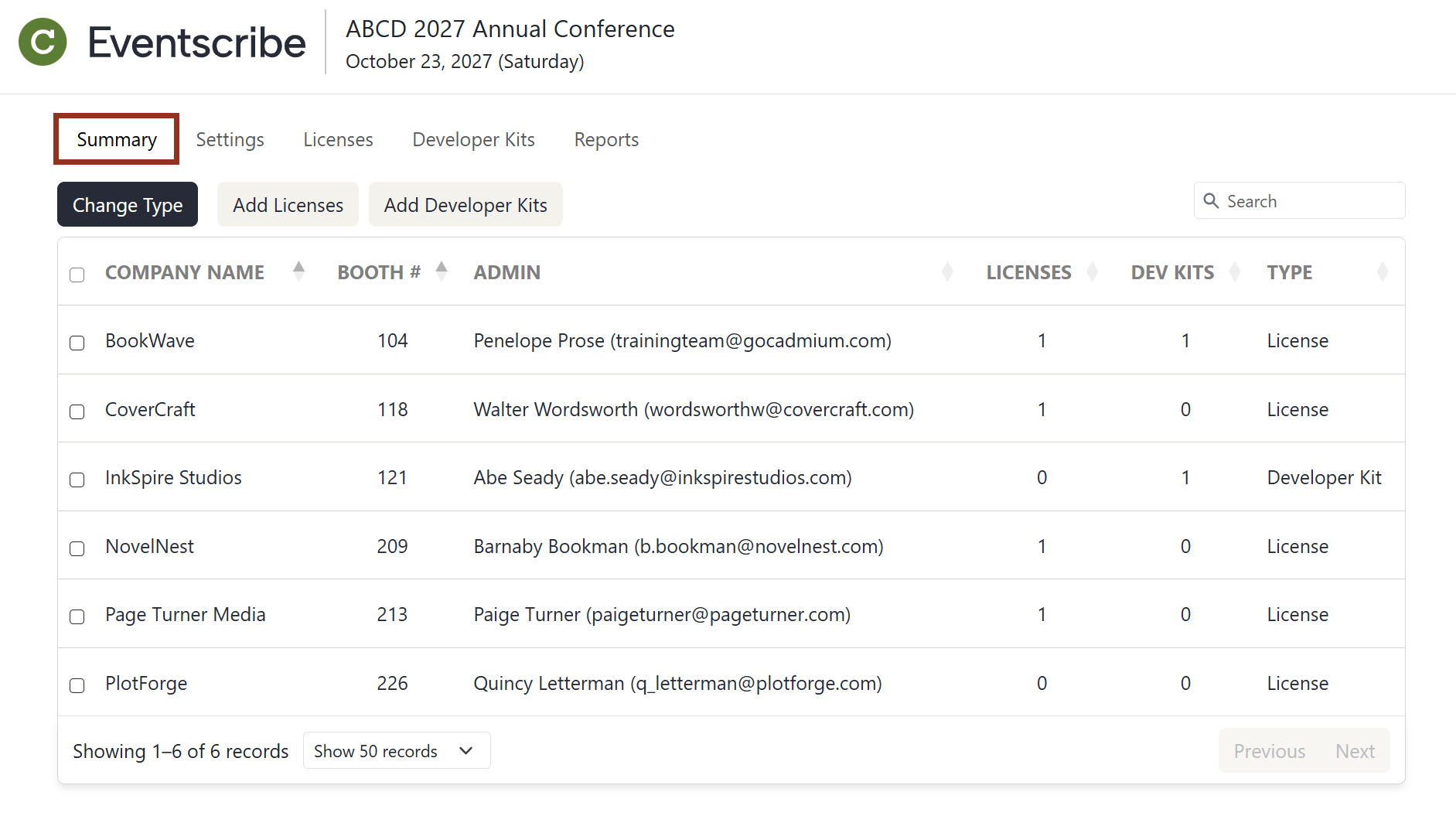
Fig. 1 - Admin Portal Summary Page.
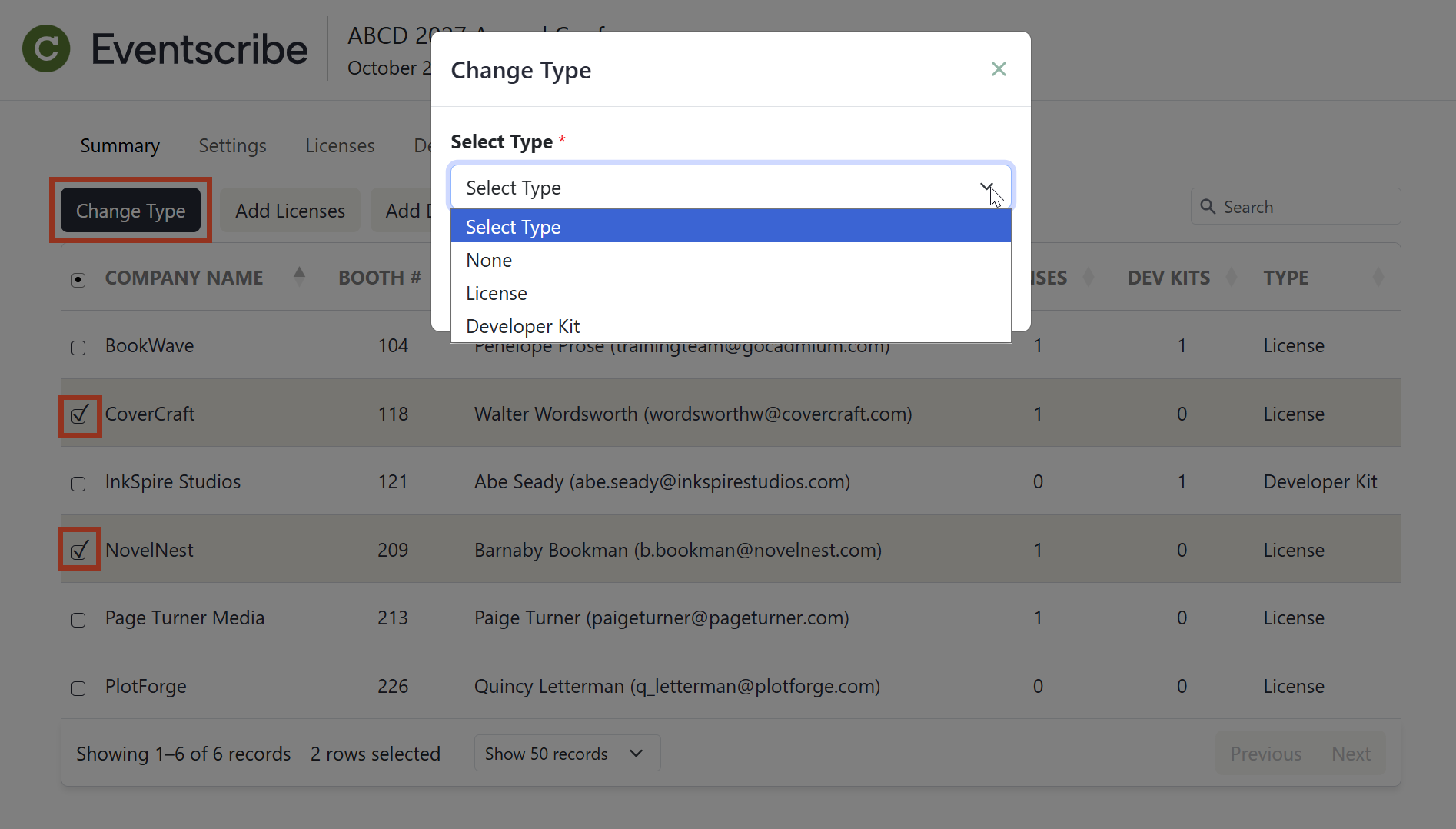
Fig. 2 - Admin Portal Summary Page Change Type Pop-up.
Was this article helpful?
That’s Great!
Thank you for your feedback
Sorry! We couldn't be helpful
Thank you for your feedback
Feedback sent
We appreciate your effort and will try to fix the article